Welcome to My Aadhaar UIDAI Portal Guide
All My Aadhaar Uidai Services
For other services like tracking status, updating details, or Aadhaar Card downloading check the services below
Quick Aadhaar Services
My Aadhaar Dashboard
Get into personal Aadhaar dashboard.
UIDAI Portal
Access official UIDAI portal.
Aadhaar Details Update
Update your details online for free until June 14, 2026.
Update / Check Enrollment Status
Track your enrollment or update progress from here.
Retrieve EID/Aadhaar Number
Recover the enrollment ID or Aadhaar.
PVC Aadhaar Card Order Now
Durable, wallet friendly PVC Aadhaar Card.
Check status of PVC Card
Get the information of PVC Aadhaar Card order.
Find Enrollment Centre
Get the address and contact information of nearby Aadhaar centres.
Book an appointment
Arrange a visit for Aadhaar service for your ease.
Aadhaar Validity
Check the validity of Aadhaar Card.
Verify mobile number/email
Confirm your email and mobile number linked with your Aadhaar Card.
Generate VID
Generate 16-digit virtual ID linked with your Aadhaar.
Aadhaar Help & Support
Get help via UIDAI support and toll-free 1947.
My Aadhaar UIDAI 2026 – Login, Download e-Aadhaar & Update Status

“What if you could manage your Aadhaar, update details, and check every status from one simple place?”
Aadhaar is a 12-digit identification number issued to every resident of India. It is managed by the Unique Identification Authority of India (UIDAI), created in 2009 under the Ministry of Electronics and Information Technology (MeitY).
UIDAI handles enrollment, verification, security, and all identity services to help residents access government schemes, banking, and digital platforms.
In this guide, you can download e-Aadhaar, update details, check enrollment or update status, retrieve Aadhaar/EID, verify your mobile or email, generate a VID, book an appointment, locate enrollment centres, and even order a PVC Aadhaar card. All essential UIDAI and My Aadhaar dashboard services are explained in simple steps.
My Aadhaar Uidai Login & Dashboard Access
You can access the My Aadhaar login portal by providing your 12-digit unique Aadhaar number and OTP. Here you can also get other value-added services besides Aadhaar card download and updating your details related to demography.
Login Process:


Access Aadhaar via myAadhaar Mobile App
From the dashboard, you can manage your Aadhaar, retrieve lost numbers, update information, download e-Aadhaar, and locate enrollment centers. Follow steps to use the app.
Steps to Use the myAadhaar Mobile App
Aadhaar Dashboard Services Overview
The Aadhaar dashboard provides multiple essential services such as Aadhaar enrolment, updating details, retrieving Aadhaar, and managing your Aadhaar information. Below is a clear and complete guide to downloading your e-Aadhaar online.
e-Aadhaar (Download Aadhaar Online)
The e-Aadhaar is a secure digital version of your Aadhaar card that you can use for verification, KYC, banking, and various other services.
How to Download e-Aadhaar Card Online (PDF Guide)
1. Open the Aadhaar Dashboard

2. Enter Your Details
To proceed with the download, fill in the required information & Choose 1 option:
This information is used to verify your identity.
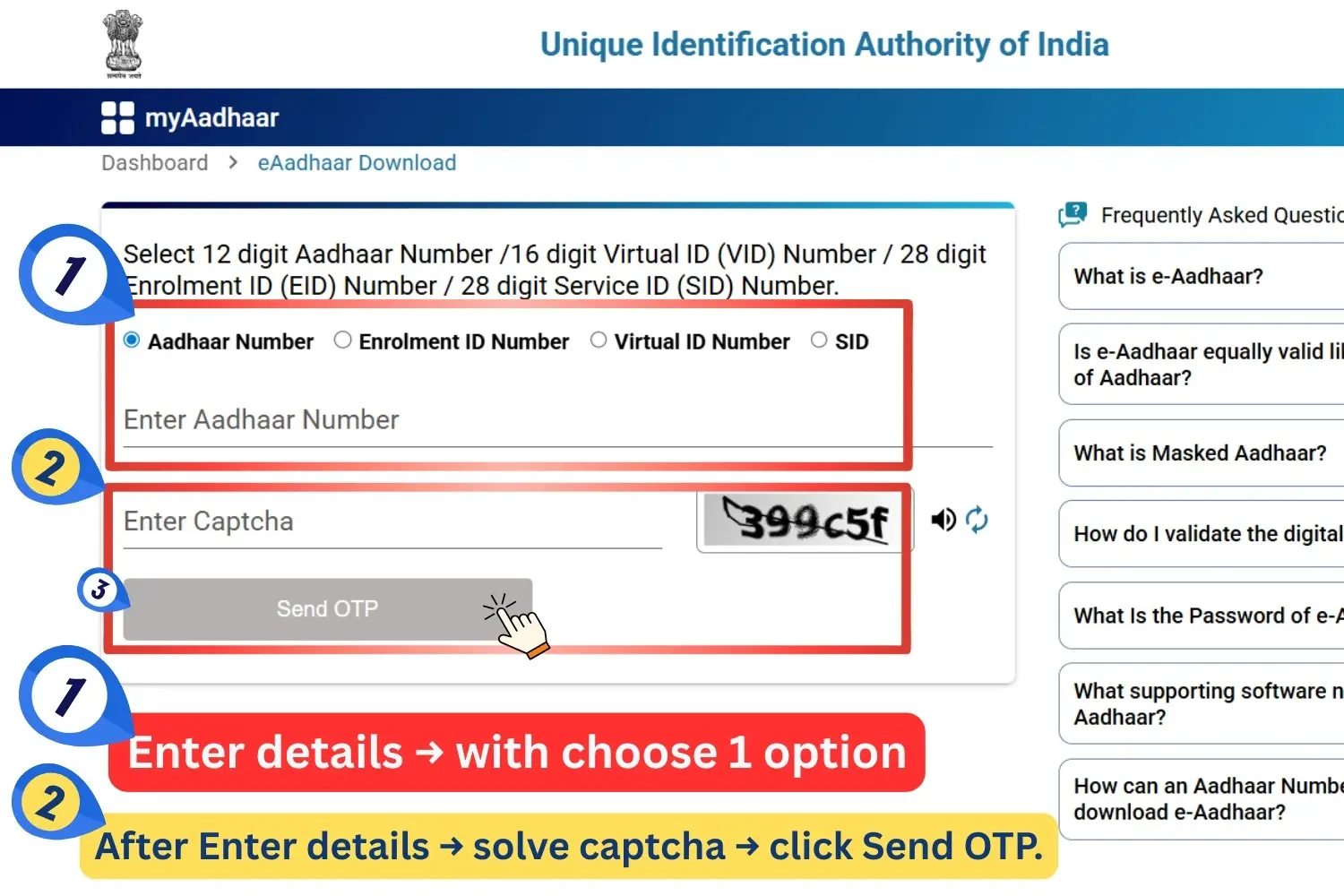
3. Authenticate via OTP
4. Download the Aadhaar PDF
Once your details are verified, you will get the option to download your Aadhaar PDF file.
Open your downloaded e-Aadhaar PDF — quick password guide
After verification, your downloaded e-Aadhaar will be available as a password-protected PDF. Use the format below to unlock it instantly — consistent with UIDAI conventions.
How to Check Your Aadhaar Enrollment & Update Status Online
You can easily track the status of your Aadhaar enrolment or any update request through the My Aadhaar dashboard. Follow the steps below to check your current status online.
1. Open the Aadhaar Status Page

2. Enter Your Detail
On the status page, fill in the required information & Choose 1 option:

3. Authenticate Using OTP
Once verified, the portal will instantly display the current status of your request—such as “Aadhaar Generated,” “In Process,” or “Under Review.”
Check Aadhaar Status Using Toll-Free Number (1947)
If you want to check the status without the internet, you can use UIDAI’s toll-free helpline.
Follow these steps:
This is the fastest offline method to know your Aadhaar update or enrollment progress.
Update Aadhaar Details and Documents Online
If any of your Aadhaar details such as name, address, gender, or date of birth need correction or updating, you can easily make changes online from the My Aadhaar dashboard. Follow the complete step-by-step process below.
1. Open the Aadhaar Document Update Page

2. Log In to Your Account

3. Select the Details to Update
On the update screen, you will find several options such as:
Choose the information you want to update.
📌 Important: Make sure you have valid supporting documents ready such as:
4. Upload Your Documents
Upload clear scanned copies of the supporting documents.
✔ Ensure:
5. Review and Submit Your Request
You can later track the status of your request on the same dashboard using your URN.
You can update documents and Aadhaar details at no cost until 14/06/2026, as per UIDAI’s current notification.
How to Update Your Aadhaar Mobile Number
To update or change the mobile number linked to your Aadhaar card, visit your nearest Aadhaar Enrolment or Update Centre.
Steps:
This update process is free and you will receive a confirmation message once it is completed. Later, you can check your mobile number update status online from the Aadhaar dashboard.
Retrieve Your Aadhaar Number or Enrolment ID (EID)
If you have misplaced your Aadhaar number or Enrolment ID (EID), you can easily retrieve it online from the My Aadhaar portal. Follow the steps below to get your details securely.
1. Open the Retrieval Page

2. Enter Your Information
On the retrieval screen, provide the required details:
3. Verify Your Details

4. Retrieve Your Number
Verify Your Aadhaar Mobile Number or Email Online
To ensure smooth Aadhaar-related services, your registered mobile number and email must be correctly linked with your Aadhaar. You can instantly verify them online through the My Aadhaar portal.
1. Open the Verification Page

2. Enter Your Aadhaar Details
On the verification screen:
3. Authenticate Using OTP

4. Confirmation
Generate or Retrieve Aadhaar Virtual ID (VID)
A Virtual ID (VID) is a temporary 16-digit number that can be used in place of your Aadhaar number for enhanced security and privacy. You can easily generate or retrieve it online using the My Aadhaar dashboard.
1. Open the VID Generator Page

2. Enter Your Aadhaar Details

3. Generate or Retrieve VID
Once verified, choose one of the following options:
Click Submit to continue.
4. Get Your Virtual ID
Your 16-digit Virtual ID will be:
Order Your Aadhaar PVC Card Online
The Aadhaar PVC card is a durable, wallet-sized version of your Aadhaar that you can easily request online from the My Aadhaar portal.
1. Open the PVC Card Order Page

2. Enter Your Aadhaar Details

3. Pay the Applicable Fee
To complete the order, you need to pay a nominal fee of ₹50, which includes:
- GST charges
- Speed Post delivery charges
Payment can be completed online through the available payment methods.
4. Confirm Your Request
5. Delivery
Check PVC Aadhaar Card Order Status Online
After placing your PVC Aadhaar card order, you can easily check the current status online from the My Aadhaar dashboard using your SRN (Service Request Number).
1. Open the Status Page
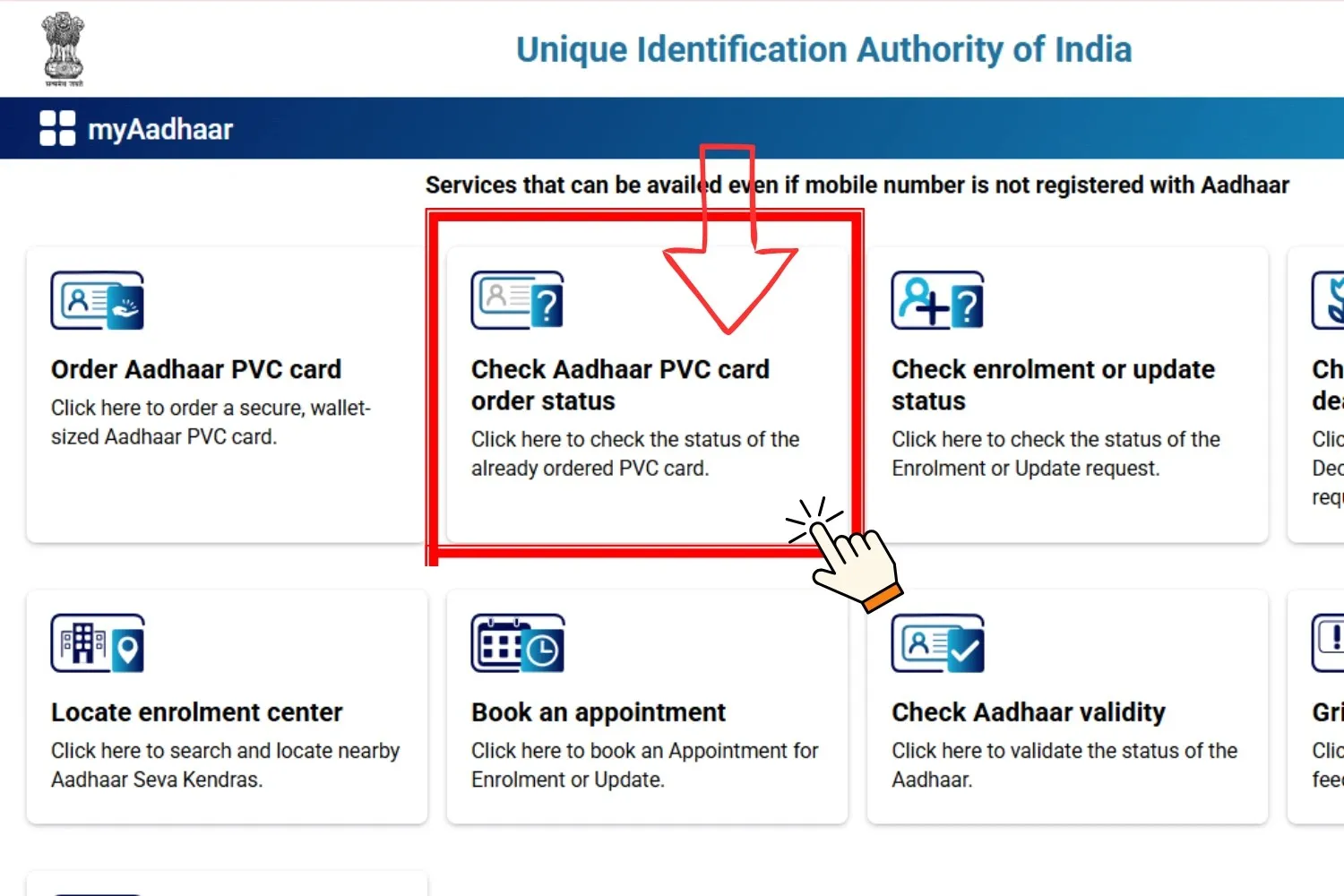
2. Enter Required Details
On the status screen, provide:
Click Submit.

3. View Your Current Status
The portal will instantly show the latest status, which may include:
This helps you track whether your PVC Aadhaar card is being printed, dispatched, or already delivered.
4. Dispatch & Delivery Timeline
Once an order is placed:
- UIDAI generally dispatches the PVC Aadhaar card to the Department of Post (DoP) within 5 working days (excluding the day of order).
- Delivery through Speed Post usually takes around 5–15 working days, depending on your location.
- The card is delivered to the address mentioned in your Aadhaar.
Locate Aadhaar Enrolment or Update Centre Near You
You can easily find the nearest Aadhaar Seva Kendra or authorised enrolment/update centre online. These centres allow you to enrol for a new Aadhaar or update existing Aadhaar details using documents and biometric verification.
1. Open the Centre Locator
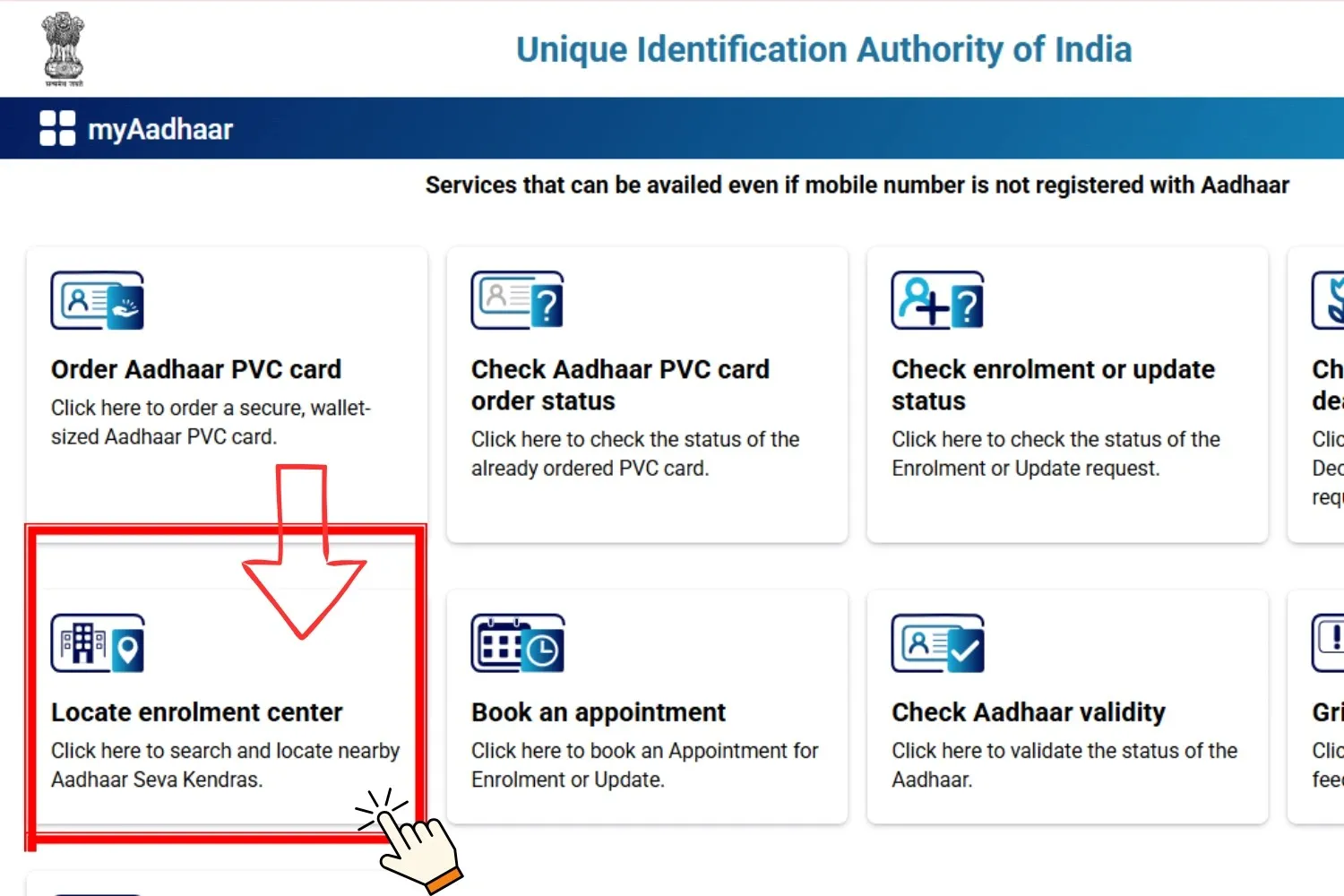
2. Search for a Centre
On the locator page, you can search using:
After entering the details, click Search to view nearby Aadhaar centres with full address, timings, and contact information.
3. Services Available at Aadhaar Centres
You can visit an Aadhaar Enrolment Centre to:
- Enroll for a new Aadhaar
-
Update existing details such as:
- Name
- Address
- Date of Birth
- Gender
- Mobile number or Email
- Valid supporting documents such as Proof of Identity (PoI) and Proof of Address (PoA)
- Biometric verification (fingerprint / iris scan)
- After updates, you’ll receive a URN (Update Request Number) to track the status online
Common Aadhaar Issues & Quick Fixes
Facing problems with OTP, e-Aadhaar, PVC card delivery, or Virtual ID? Use these quick tips to fix the most common Aadhaar-related issues.
OTP Not Received
Check your mobile network, confirm that the number is linked with Aadhaar, and request the OTP again after a short wait.
e-Aadhaar PDF Not Opening
Enter the password in the correct format: first four letters of your name in UPPERCASE followed by your birth year (YYYY).
Incorrect Details on Aadhaar
Use the “Update Aadhaar Details” section on the UIDAI portal to correct your name, address, or any other demographic information.
PVC Aadhaar Card Delay
Track your PVC Aadhaar order status using the Service Request Number (SRN) on the UIDAI portal to see if it is processed or dispatched.
Virtual ID (VID) Issues
If your existing VID has expired or is not working, generate a fresh Virtual ID using the VID Generator option on the My Aadhaar portal.
Aadhaar Security & Privacy Tips
1. Never share OTP with anyone.
2. Use VID instead of Aadhaar number whenever possible for KYC or verification.
3. Download e-Aadhaar only from UIDAI’s official portal.
4. Avoid giving photocopies of Aadhaar to random agents. Use Masked Aadhaar instead.
5. Check your Aadhaar authentication history monthly to detect misuse.
6. Keep mobile number updated so you get alerts for all Aadhaar-related actions.
About Aadhaar
The Aadhaar program is a great initiative that provides a unique 12-digit identification number to every resident of India and is operating under the Unique Identification Authority of India (UIDAI). It facilitates people with government subsidies, other banking (like Aadhaar card bank link), and telecom services.
This system is available for all the residents of India and non-residents in India but with the condition of staying in India at least 182 days in the last 12 months.
This system aims to provide a unique identity that keeps the demographic data like name, address, mobile number, email, and date of birth etc. This also creates biometrics data like fingerprints, iris scan, and pictures of the person.
Core Features
-
Unique Identity: Aadhaar keeps only unique data by deduplication, ensuring there is no repeating or redundant identity.
-
e-Aadhaar: This facility makes a password protected PDF file under your data that is also comes under Aadhaar Act 2016. (Where the e aadhar card password is the first four letters in Capital and your date of birth). You can perform an e aadhar card download from the portal.
-
Masked Aadhaar: The system does not show the whole Aadhaar number; rather, it just shows the last four digits of your Aadhaar number to make sure privacy.
-
Baal Aadhaar: This feature is for children under 5, in which only a photograph is taken without any biometrics to save the data of children under parents’ Aadhaar.
-
PVC Card: With the nominal fee of ₹50, you can get your PVC Aadhaar Card that is delivered within 5 working days.
-
Virtual ID (VID): To enhance the privacy, there is a 16-digit temporary number for authentication that is revocable using Aadhaar.
-
No Proof of Residence: Aadhaar is only for address and identity. As it is clearly mentioned by UIDAI and Supreme Court of India rulings.
Applications
-
Financial Benefits: It simplifies bank accounts, insurance, and mutual funds at one place.
-
Direct Benefit Transfer (DBT): This ensures a direct delivery option in the case of subsidies.
-
Digital Services: You can pay for e-Governance platforms, and can use UPI or Aadhaar-enabled Payment System.
UIDAI (Unique Identification Authority of India)
The Ministry of Electronics and Information Technology (MeitY) operates UIDAI that runs the Aadhaar program. The Unique Identification Authority of India (UIDAI) is made under the Aadhaar (Targeted Delivery of Financial and other subsidies, benefits and services) Act on July 12, 2009.